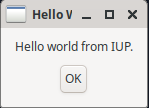
Tutorial: Hello World
This tutorial follows the Hello World Tutorial example from Tecgraf’s IUP documentation.
This tutorial introduces some fundamental techniques for working with the library. A working program for each section N can be found as "examples/hello-world-N.rb", downloadable from the latest tagged version.
1. Initialisation
require "iup-ffi"

Iup.mainloop do
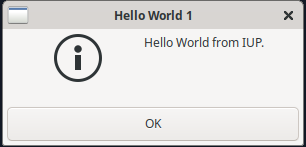
  Iup.message("Hello World 1", "Hello World from IUP.")
  exit
end
This first program uses a custom function to create a simple dialog.
To go line by line:
-
The first line requires the "iup-ffi" library.
-
The second line begins the Iup event loop: all Iup functions must be called from within this loop.
-
The third line creates an information dialog using a special function.
-
The fourth line,
exit, is needed only for this use ofmessage, as there is no other way to quit the program.
To run this program, save it to a file called "hello.rb", and call
$ ruby hello.rb
2. Creating a Dialog
Most programs will require more complex arrangements of GUI elements.
For this, the top-level form is known as a Dialog, and elements like
labels or buttons are organised using various boxes.
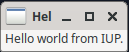
This next example displays a label on a custom dialog:
require "iup-ffi"

Iup.mainloop do
  label = Iup::Label.new("Hello world from IUP.")
  dlg = Iup::Dialog.new(Iup::VBox.new(label))
  dlg.title = "Hello World 2"
  dlg.show
end
We first construct an instance of a label: note that IUP’s GUI elements are Ruby classes: for the label, we must provide the label text in the constructor.
The next line creates a dialog, packing the label within a VBox
for layout. We then add a title to the dialog before showing it.
The API documentation has more information on Iup::Dialog, Iup::Label, and Iup::VBox.
2.1. Attribute setting
The constructor for all the GUI widgets accepts an optional block which yields self: this can be used to set up the attributes. For example, the above could be rewritten as:
require "iup-ffi"

Iup.mainloop do
  label = Iup::Label.new("Hello world from IUP.")
  Iup::Dialog.new(Iup::VBox.new(label)) do |d|
    d.title = "Hello World 2"
  end.show
end
3. Adding Interaction
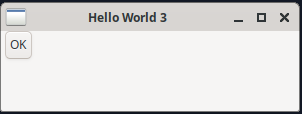
This next example adds some user-interaction in the form of a button: when clicked, a dialog will popup and then the program exits.
require "iup-ffi"

def btn_exit_cb
  Iup.message("Hello World Message", "Hello world from IUP")
  Iup::CLOSE
end

Iup.mainloop do
  button = Iup::Button.new("OK", ->{ btn_exit_cb })
  Iup::Dialog.new(Iup::VBox.new(button)) do |d|
    d.title = "Hello World 3"
    d.size = "200x50"
  end.show
end
There are two new features to this program (but do note the setting
of size).
First, the btn_exit_cb is a function which will be called when
a button is clicked. Notice the return value: Iup::CLOSE is used
as a return value to force the program to close.
Second, the button constructor takes two values: the title, and a
function to call when clicked. Here, the btn_exit_cb function is
wrapped in a stabby lambda.
The API documentation has more information on Iup::Button.
3.1. Button actions
Button actions can alternatively be set up as an attribute:
  button = Iup::Button.new("OK") do |b|
    b.action = ->{
      Iup.message("Hello World Message", "Hello world from IUP")
      Iup::CLOSE
    }
  end
4. Adding Layout Elements
Layout is controlled relatively using various boxes, vertical boxes (VBox),
horizontal boxes (HBox), and fills. There is also a ZBox for constructing
layers of elements.
As a small extension to our example, we layout a label and a button:
require "iup-ffi"

def btn_exit_cb
  Iup::CLOSE
end

Iup.mainloop do
  label = Iup::Label.new("Hello world from IUP.")
  button = Iup::Button.new("OK", ->{ btn_exit_cb })
  vbox = Iup::VBox.new(label, button)
  Iup::Dialog.new(vbox) do |d|
    d.title = "Hello World 4"
    d.size = "200x50"
  end.show
end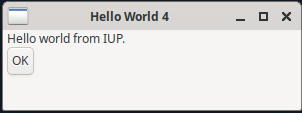
The API documentation has more information on Iup::HBox.
5. Improving the Layout
There are three attributes for VBox and HBox elements:
-
alignment: defines the horizontal or vertical alignment of elements inside the box. The values are "ALEFT", "ACENTER", "ARIGHT" for a horizontal box, and "ATOP", "ACENTER", "ABOTTOM" for a vertical box. -
gap: defines a space in pixels between each element inside the box. -
margin: defines an outer margin around the enclosed elements. This is defined as a string "widthxheight", e.g. "10x20".
require "iup-ffi"

def btn_exit_cb
  Iup::CLOSE
end

Iup.mainloop do
  label = Iup::Label.new("Hello world from IUP.")
  button = Iup::Button.new("OK", ->{ btn_exit_cb })
  vbox = Iup::VBox.new(label, button) do |v|
    v.alignment = "acenter"
    v.gap = 10
    v.margin = "10x10"
  end
  Iup::Dialog.new(vbox) do |d|
    d.title = "Hello World 5"
  end.show
end