<?xml version="1.0" encoding="utf-8"?><feed xmlns="http://www.w3.org/2005/Atom" ><generator uri="https://jekyllrb.com/" version="4.4.1">Jekyll</generator><link href="/feed.xml" rel="self" type="application/atom+xml" /><link href="/" rel="alternate" type="text/html" /><updated>2026-02-08T11:39:35+00:00</updated><id>/feed.xml</id><title type="html">Peter’s (Mostly Ruby) Scrapbook</title><subtitle>This blog will be focussed mostly on Ruby.</subtitle><author><name>Peter Lane</name></author><entry><title type="html">Matrices in Ruby</title><link href="/2026/02/07/matrices-in-ruby.html" rel="alternate" type="text/html" title="Matrices in Ruby" /><published>2026-02-07T00:00:00+00:00</published><updated>2026-02-07T00:00:00+00:00</updated><id>/2026/02/07/matrices-in-ruby</id><content type="html" xml:base="/2026/02/07/matrices-in-ruby.html"><![CDATA[<div id="toc" class="toc">
<div id="toctitle">Table of Contents</div>
<ul class="sectlevel1">
<li><a href="#matrices">1. Matrices</a>
<ul class="sectlevel2">
<li><a href="#creating-arrays">1.1. Creating arrays</a></li>
<li><a href="#array-indexing">1.2. Array indexing</a></li>
<li><a href="#reshapingsplittingjoining-arrays">1.3. Reshaping/splitting/joining arrays</a></li>
<li><a href="#scalar-operations">1.4. Scalar operations</a></li>
<li><a href="#operations-on-two-matrices">1.5. Operations on two matrices</a></li>
<li><a href="#single-matrix-operations">1.6. Single matrix operations</a></li>
</ul>
</li>
<li><a href="#graph-plotting">2. Graph Plotting</a></li>
</ul>
</div>
<div id="preamble">
<div class="sectionbody">
<div class="paragraph">
<p>This semester, I have taken on a module taught using Python + numpy + various
packages, which I am learning as I go. In this and later posts, I shall explore
how the Python stuff can be replicated in Ruby.</p>
</div>
<div class="paragraph">
<p>I am not interested in "notebook" environments. My explorations will be
conducted in <code>irb</code>.</p>
</div>
</div>
</div>
<div class="sect1">
<h2 id="matrices">1. Matrices</h2>
<div class="sectionbody">
<div class="paragraph">
<p>Ruby has a <a href="https://rubygems.org/gems/matrix">matrix</a> library, built-in.
However, for faster performance, other libraries are available: I shall use
<a href="https://rubygems.org/gems/numo-narray-alt">numo-narray-alt</a> and
<a href="https://rubygems.org/gems/numo-linalg-alt">numo-linalg-alt</a>.  These libraries
are supported by yoshoku, the developer of the Ruby machine-learning library
<a href="https://rubygems.org/gems/rumale">rumale</a>.</p>
</div>
<div class="paragraph">
<p>Once installed:</p>
</div>
<div class="listingblock">
<div class="content">
<pre>irb(main):001&gt; require "numo/narray"
=&gt; true
irb(main):003&gt; Numo::NArray::VERSION
=&gt; "0.10.0"</pre>
</div>
</div>
<div class="sect2">
<h3 id="creating-arrays">1.1. Creating arrays</h3>
<div class="paragraph">
<p>A <code>numo</code> array can be created from a Ruby array:</p>
</div>
<div class="listingblock">
<div class="content">
<pre>irb(main):006&gt; a = Numo::NArray[1,3,6,10]
=&gt;
Numo::Int32#shape=[4]
...
irb(main):007&gt; p a
Numo::Int32#shape=[4]
[1, 3, 6, 10]
=&gt;
Numo::Int32#shape=[4]
[1, 3, 6, 10]</pre>
</div>
</div>
<div class="paragraph">
<p>Creating a 1D and 2D array of random integers:</p>
</div>
<div class="listingblock">
<div class="content">
<pre>irb(main):020&gt; Numo::Int32.new(4).rand(5)
=&gt;
Numo::Int32#shape=[4]
[3, 4, 2, 4]
irb(main):021&gt; Numo::Int32.new(2,3).rand(5)
=&gt;
Numo::Int32#shape=[2,3]
[[2, 4, 3],
 [3, 0, 3]]</pre>
</div>
</div>
</div>
<div class="sect2">
<h3 id="array-indexing">1.2. Array indexing</h3>
<div class="paragraph">
<p>(output has been abbreviated)</p>
</div>
<div class="listingblock">
<div class="content">
<pre># create sequence of 12 integers
irb(main):035&gt; c = Numo::Int32.new(12).seq

# extract first four elements
irb(main):036&gt; c[0...4]
[0, 1, 2, 3]
irb(main):037&gt; c[0..3]
[0, 1, 2, 3]

# extract every other element from first four elements
irb(main):038&gt; c[(0..3).step(2)]
[0, 2]

# extract every third element, starting from first
irb(main):039&gt; c[(0..).step(3)]
[0, 3, 6, 9]

# extract every other element, starting from second
irb(main):040&gt; c[(1..).step(2)]
[1, 3, 5, 7, 9, 11]

# extract elements in reverse, from index 5
irb(main):044&gt; c[(0..5)].reverse
[5, 4, 3, 2, 1, 0]</pre>
</div>
</div>
<div class="paragraph">
<p>Similarly for multi-dimensional slices:</p>
</div>
<div class="listingblock">
<div class="content">
<pre>irb(main):045&gt; x = Numo::Int32.new(3,4).rand(12)
=&gt;
Numo::Int32#shape=[3,4]
[[11, 0, 1, 5],
 [9, 2, 1, 7],
 [10, 10, 3, 0]]
irb(main):052&gt; x[1...2,0...2]
=&gt;
Numo::Int32(view)#shape=[1,2]
[[9, 2]]</pre>
</div>
</div>
</div>
<div class="sect2">
<h3 id="reshapingsplittingjoining-arrays">1.3. Reshaping/splitting/joining arrays</h3>
<div class="paragraph">
<p>Reshaping lets us convert a 1D array into a 2D one:</p>
</div>
<div class="listingblock">
<div class="content">
<pre>irb(main):057&gt; d = c.reshape(3,4)
irb(main):058&gt; d
Numo::Int32#shape=[3,4]
[[0, 1, 2, 3],
 [4, 5, 6, 7],
 [8, 9, 10, 11]]</pre>
</div>
</div>
<div class="paragraph">
<p>For combining matrices, there is <code>concatenate</code>, using <code>axis</code> to control which
dimension the concatenation is performed along:</p>
</div>
<div class="listingblock">
<div class="content">
<pre>irb(main):095&gt; a = Numo::Int32[[1,2], [3,4]]
irb(main):096&gt; b = Numo::Int32[[5,6]]
irb(main):097&gt; a
[[1, 2],
 [3, 4]]
irb(main):098&gt; b
[[5, 6]]
irb(main):099&gt; a.concatenate(b)
[[1, 2],
 [3, 4],
 [5, 6]]
irb(main):101&gt; a.concatenate(b.transpose, axis:1)
[[1, 2, 5],
 [3, 4, 6]]</pre>
</div>
</div>
<div class="paragraph">
<p>For dividing matrices, there is <code>split</code>, again using <code>axis</code> to determine
how the matrix is subdivided:</p>
</div>
<div class="listingblock">
<div class="content">
<pre>irb(main):075&gt; d
[[0, 1, 2, 3],
 [4, 5, 6, 7],
 [8, 9, 10, 11]]

irb(main):103&gt; d.split(2) # axis:0
=&gt;
[Numo::Int32(view)#shape=[2,4]
[[0, 1, 2, 3],
 [4, 5, 6, 7]],
 Numo::Int32(view)#shape=[1,4]
[[8, 9, 10, 11]]]
irb(main):104&gt; d.split(2, axis:1)
=&gt;
[Numo::Int32(view)#shape=[3,2]
[[0, 1],
 [4, 5],
 [8, 9]],
 Numo::Int32(view)#shape=[3,2]
[[2, 3],
 [6, 7],
 [10, 11]]]</pre>
</div>
</div>
</div>
<div class="sect2">
<h3 id="scalar-operations">1.4. Scalar operations</h3>
<div class="paragraph">
<p>These are applied to individual elements of the array, preserving
its structure:</p>
</div>
<div class="listingblock">
<div class="content">
<pre>irb(main):105&gt; a = Numo::Int32[10, 15, -2, 9]
irb(main):107&gt; b = Numo::Int32.new(4).seq

irb(main):110&gt; 2*a
[20, 30, -4, 18]
irb(main):111&gt; a*2
[20, 30, -4, 18]
irb(main):112&gt; b**2
[0, 1, 4, 9]
irb(main):122&gt; a.abs
[10, 15, 2, 9]
irb(main):123&gt; a+4
[14, 19, 2, 13]
irb(main):124&gt; a-3
[7, 12, -5, 6]
irb(main):125&gt; -a
[-10, -15, 2, -9]
irb(main):126&gt; a % 2
[0, 1, 0, 1]</pre>
</div>
</div>
</div>
<div class="sect2">
<h3 id="operations-on-two-matrices">1.5. Operations on two matrices</h3>
<div class="listingblock">
<div class="content">
<pre>irb(main):108&gt; a+b
[10, 16, 0, 12]
irb(main):109&gt; a-b
[10, 14, -4, 6]
irb(main):127&gt; a.gt b
[1, 1, 0, 1]
irb(main):129&gt; a.ge b
[1, 1, 0, 1]
irb(main):132&gt; a.lt b
[0, 0, 1, 0]
irb(main):133&gt; a.le b
[0, 0, 1, 0]</pre>
</div>
</div>
<div class="paragraph">
<p>The comparison operations, like <code>gt</code>, return 1 if the corresponding elements
match the condition, else 0.</p>
</div>
<div class="paragraph">
<p>In the following, notice that <code>*</code> performs element-wise multiplication and
<code>dot</code> performs matrix multiplication:</p>
</div>
<div class="listingblock">
<div class="content">
<pre>irb(main):002&gt; a = Numo::Int32[[2,3],[5,-8]]
irb(main):003&gt; b = Numo::Int32[[1,-4],[8,-6]]
irb(main):004&gt; a+b
[[3, -1],
 [13, -14]]
irb(main):005&gt; a*b
[[2, -12],
 [40, 48]]
irb(main):006&gt; a.dot b
[[26, -26],
 [-59, 28]]</pre>
</div>
</div>
</div>
<div class="sect2">
<h3 id="single-matrix-operations">1.6. Single matrix operations</h3>
<div class="paragraph">
<p>These take a matrix and convert it to another matrix or scalar:</p>
</div>
<div class="listingblock">
<div class="content">
<pre>irb(main):117&gt; m = Numo::Int32[[2,3],[5,-8]]
irb(main):118&gt; m.sum
=&gt; 2
irb(main):119&gt; m.min
=&gt; -8
irb(main):120&gt; m.max
=&gt; 5
irb(main):129&gt; m.diagonal
[2, -8]
irb(main):130&gt; m.trace
=&gt; -6</pre>
</div>
</div>
<div class="paragraph">
<p>and, using the <code>numo-linalg-alt</code> library:</p>
</div>
<div class="listingblock">
<div class="content">
<pre>irb(main):002&gt; require "numo/linalg"
irb(main):004&gt; Numo::Linalg.inv(m)
=&gt;
Numo::DFloat#shape=[2,2]
[[0.258065, 0.0967742],
 [0.16129, -0.0645161]]
irb(main):005&gt; Numo::Linalg.det(m)
=&gt; -31.0</pre>
</div>
</div>
</div>
</div>
</div>
<div class="sect1">
<h2 id="graph-plotting">2. Graph Plotting</h2>
<div class="sectionbody">
<div class="paragraph">
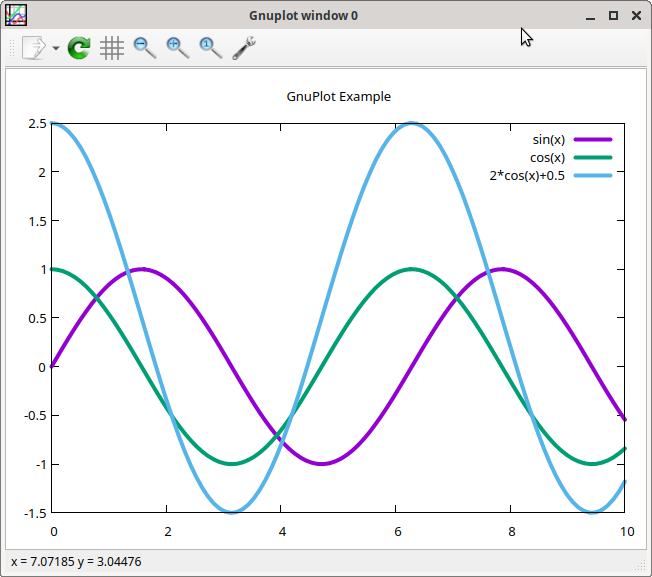
<p>The final part was about plotting a graph using matplotlib, for
which Ruby is well served by the <code>gnuplot</code> gem:</p>
</div>
<div class="listingblock">
<div class="content">
<pre class="rouge highlight"><code data-lang="ruby"><span class="nb">require</span> <span class="s2">"gnuplot"</span>

<span class="no">Gnuplot</span><span class="p">.</span><span class="nf">open</span> <span class="k">do</span> <span class="o">|</span><span class="n">gp</span><span class="o">|</span>
  <span class="no">Gnuplot</span><span class="o">::</span><span class="no">Plot</span><span class="p">.</span><span class="nf">new</span><span class="p">(</span> <span class="n">gp</span> <span class="p">)</span> <span class="k">do</span> <span class="o">|</span><span class="n">plot</span><span class="o">|</span>

    <span class="n">plot</span><span class="p">.</span><span class="nf">xrange</span> <span class="s2">"[0:10]"</span>
    <span class="n">plot</span><span class="p">.</span><span class="nf">title</span>  <span class="s2">"GnuPlot Example"</span>

    <span class="n">plot</span><span class="p">.</span><span class="nf">data</span> <span class="o">&lt;&lt;</span> <span class="no">Gnuplot</span><span class="o">::</span><span class="no">DataSet</span><span class="p">.</span><span class="nf">new</span><span class="p">(</span> <span class="s2">"sin(x)"</span> <span class="p">)</span> <span class="k">do</span> <span class="o">|</span><span class="n">ds</span><span class="o">|</span>
      <span class="n">ds</span><span class="p">.</span><span class="nf">with</span> <span class="o">=</span> <span class="s2">"lines"</span>
      <span class="n">ds</span><span class="p">.</span><span class="nf">linewidth</span> <span class="o">=</span> <span class="mi">4</span>
    <span class="k">end</span>

    <span class="n">plot</span><span class="p">.</span><span class="nf">data</span> <span class="o">&lt;&lt;</span> <span class="no">Gnuplot</span><span class="o">::</span><span class="no">DataSet</span><span class="p">.</span><span class="nf">new</span><span class="p">(</span> <span class="s2">"cos(x)"</span> <span class="p">)</span> <span class="k">do</span> <span class="o">|</span><span class="n">ds</span><span class="o">|</span>
      <span class="n">ds</span><span class="p">.</span><span class="nf">with</span> <span class="o">=</span> <span class="s2">"lines"</span>
      <span class="n">ds</span><span class="p">.</span><span class="nf">linewidth</span> <span class="o">=</span> <span class="mi">4</span>
    <span class="k">end</span>

    <span class="n">plot</span><span class="p">.</span><span class="nf">data</span> <span class="o">&lt;&lt;</span> <span class="no">Gnuplot</span><span class="o">::</span><span class="no">DataSet</span><span class="p">.</span><span class="nf">new</span><span class="p">(</span> <span class="s2">"2*cos(x)+0.5"</span> <span class="p">)</span> <span class="k">do</span> <span class="o">|</span><span class="n">ds</span><span class="o">|</span>
      <span class="n">ds</span><span class="p">.</span><span class="nf">with</span> <span class="o">=</span> <span class="s2">"lines"</span>
      <span class="n">ds</span><span class="p">.</span><span class="nf">linewidth</span> <span class="o">=</span> <span class="mi">4</span>
    <span class="k">end</span>
  <span class="k">end</span>
<span class="k">end</span></code></pre>
</div>
</div>
<div class="imageblock">
<div class="content">
<img src="/images/gnuplot-eg.png" alt="gnuplot eg">
</div>
</div>
</div>
</div>]]></content><author><name>Peter Lane</name></author><summary type="html"><![CDATA[This semester, I have taken on a module taught using Python + numpy + various packages, which I am learning as I go. In this and later posts, I shall explore how the Python stuff can be replicated in Ruby.]]></summary></entry><entry><title type="html">Developing with Bundler</title><link href="/2025/12/21/developing-with-bundler.html" rel="alternate" type="text/html" title="Developing with Bundler" /><published>2025-12-21T00:00:00+00:00</published><updated>2025-12-21T00:00:00+00:00</updated><id>/2025/12/21/developing-with-bundler</id><content type="html" xml:base="/2025/12/21/developing-with-bundler.html"><![CDATA[<div id="preamble">
<div class="sectionbody">
<div class="paragraph">
<p><a href="https://bundler.io/">Bundler</a> is a popular Ruby tool, which I have not
paid much attention to before. What is it for? And how (or should) I
use it?</p>
</div>
<div class="paragraph">
<p>The main point to remember is that Bundler exists to help <em>developers</em>, not
users. In particular, it helps teams of developers use a consistent set of libraries
when working on a single project.</p>
</div>
</div>
</div>
<div class="sect1">
<h2 id="enforcing-dependency-versions">Enforcing Dependency Versions</h2>
<div class="sectionbody">
<div class="paragraph">
<p>The idea is to enforce, for the developer, a known set of dependency versions,
so different developers can work from the same set of code. This is controlled
using the <code>Gemfile</code>, which stores references to dependent libraries. To start a
project with a single dependency with a known version:</p>
</div>
<div class="listingblock">
<div class="content">
<pre>$ bundle init
$ bundle add confusion_matrix -v 1.1.0
$ more Gemfile
# frozen_string_literal: true

source "https://rubygems.org"

# gem "rails"

gem "confusion_matrix", "= 1.1.0"</pre>
</div>
</div>
<div class="paragraph">
<p>We can test the version of a library being used with this simple program:</p>
</div>
<div class="listingblock">
<div class="content">
<pre>$ more hello.rb
require "confusion_matrix"

puts Gem.loaded_specs()["confusion_matrix"]</pre>
</div>
</div>
<div class="paragraph">
<p>The last line displays information about the loaded library. When run directly
from Ruby, our script picks up the library version currently installed in the
global gem list, in this case 1.1.1:</p>
</div>
<div class="listingblock">
<div class="content">
<pre>$ ruby hello.rb
&lt;Gem::Specification name=confusion_matrix version=1.1.1&gt;</pre>
</div>
</div>
<div class="paragraph">
<p>To ensure we use the version specified in the Gemfile, call the script through
bundler:</p>
</div>
<div class="listingblock">
<div class="content">
<pre>$ bundle exec ruby hello.rb
&lt;Bundler::StubSpecification name=confusion_matrix version=1.1.0 platform=ruby&gt;</pre>
</div>
</div>
</div>
</div>
<div class="sect1">
<h2 id="controlling-dependencies">Controlling Dependencies</h2>
<div class="sectionbody">
<div class="paragraph">
<p>Although we can separately list dependencies in the <code>Gemfile</code>, it is considered
better practice to rely on the .gemspec file, e.g. for <a href="https://rubygems.org/gems/chess_data">chess_data</a>:</p>
</div>
<div class="listingblock">
<div class="content">
<pre class="rouge highlight"><code data-lang="ruby"><span class="n">s</span><span class="p">.</span><span class="nf">add_dependency</span> <span class="s1">'word_wrap'</span><span class="p">,</span> <span class="s1">'~&gt; 1.0'</span>
<span class="n">s</span><span class="p">.</span><span class="nf">add_development_dependency</span> <span class="s1">'minitest'</span><span class="p">,</span> <span class="s1">'~&gt; 6.0'</span>
<span class="n">s</span><span class="p">.</span><span class="nf">add_development_dependency</span> <span class="s2">"rake"</span><span class="p">,</span> <span class="s2">"~&gt; 13.0"</span></code></pre>
</div>
</div>
<div class="paragraph">
<p>We create a file called <code>Gemfile</code> for bundler to use, which reads all the dependencies from
the .gemspec file:</p>
</div>
<div class="listingblock">
<div class="content">
<pre class="rouge highlight"><code data-lang="ruby"><span class="n">source</span> <span class="s2">"https://rubygems.org"</span>
<span class="n">gemspec</span></code></pre>
</div>
</div>
<div class="paragraph">
<p>There is one caveat to this: if some gems come from a different source, put
them before the <code>gemspec</code> call:</p>
</div>
<div class="listingblock">
<div class="content">
<pre class="rouge highlight"><code data-lang="ruby"><span class="n">source</span> <span class="s2">"https://rubygems.org"</span>

<span class="n">source</span> <span class="s2">"https://codeberg.org/api/packages/peterlane/rubygems"</span> <span class="k">do</span>
	<span class="n">gem</span> <span class="s2">"plane_pdf"</span><span class="p">,</span> <span class="s2">"0.1.0"</span>
<span class="k">end</span>

<span class="n">gemspec</span></code></pre>
</div>
</div>
<div class="paragraph">
<p>Finally, generate the <code>Gemfile.lock</code> file by calling <code>bundle install</code>: this file records
the exact versions of libraries which you are using.</p>
</div>
<div class="paragraph">
<p>Both the <code>Gemfile</code> and <code>Gemfile.lock</code> files should be included with the source code
for use by other developers - i.e. commit both files to your git repository.
The same set of dependencies can be downloaded using <code>bundle install</code> with the
<code>Gemfile.lock</code> file.</p>
</div>
<div class="paragraph">
<p>During development, use:</p>
</div>
<div class="listingblock">
<div class="content">
<pre>$ bundle exec rake test</pre>
</div>
</div>
<div class="paragraph">
<p>which ensures the locked dependencies are used to run the test tasks.</p>
</div>
</div>
</div>]]></content><author><name>Peter Lane</name></author><summary type="html"><![CDATA[Bundler is a popular Ruby tool, which I have not paid much attention to before. What is it for? And how (or should) I use it?]]></summary></entry><entry><title type="html">Hello Jekyll Blog</title><link href="/2025/12/10/hello-jekyll-blog.html" rel="alternate" type="text/html" title="Hello Jekyll Blog" /><published>2025-12-10T00:00:00+00:00</published><updated>2025-12-10T00:00:00+00:00</updated><id>/2025/12/10/hello-jekyll-blog</id><content type="html" xml:base="/2025/12/10/hello-jekyll-blog.html"><![CDATA[<div id="preamble">
<div class="sectionbody">
<div class="paragraph">
<p>This is the start of a new website of notes, this time with a focus on Ruby and
built with <a href="https://jekyllrb.com">jekyll</a>.</p>
</div>
</div>
</div>
<div class="sect1">
<h2 id="supporting-asciidoc">Supporting asciidoc</h2>
<div class="sectionbody">
<div class="paragraph">
<p>I prefer to write in asciidoc format, and jekyll supports
<a href="https://asciidoctor.org">asciidoctor</a> through the
<a href="https://github.com/asciidoctor/jekyll-asciidoc">jekyll-asciidoc</a> plugin.</p>
</div>
<div class="paragraph">
<p>To install, add the plugin to Gemfile:</p>
</div>
<div class="listingblock">
<div class="content">
<pre>group :jekyll_plugins do
  # OTHER PLUGINS
  gem "jekyll-asciidoc"
end</pre>
</div>
</div>
<div class="paragraph">
<p>call <code>bundle install</code>.</p>
</div>
</div>
</div>
<div class="sect1">
<h2 id="codeberg-link">Codeberg link</h2>
<div class="sectionbody">
<div class="paragraph">
<p>I added an icon/configuration for codeberg in the list of social links by
copying _includes/social.html to the base folder of my website, and then adding
the following to the other options:</p>
</div>
<div class="listingblock">
<div class="content">
<pre>  {%- if site.codeberg_username -%}
  &lt;li&gt;&lt;a href="https://codeberg.org/{{ site.codeberg_username| cgi_escape | escape }}"&gt;
   &lt;img src="https://codeberg.org/assets/img/favicon.png" height="16"&gt;_&lt;span class="username"&gt;
       {{ site.codeberg_username| escape }}
     &lt;/span&gt;
   &lt;/a&gt;
 &lt;/li&gt;
 {%- endif -%}</pre>
</div>
</div>
<div class="paragraph">
<p>Add to _config.yml:</p>
</div>
<div class="listingblock">
<div class="content">
<pre>codeberg_username: peterlane</pre>
</div>
</div>
</div>
</div>]]></content><author><name>Peter Lane</name></author><summary type="html"><![CDATA[This is the start of a new website of notes, this time with a focus on Ruby and built with jekyll.]]></summary></entry></feed>